Troubleshooting
The pad does not reliably switch functions or switches incorrectly
- First, check if the KLM is configured correctly. Open the system settings and check the entries "Assignment K1" and "Assignment K2".
- Press the keys in the following order and check whether the values each decrease by 14.5%, starting from the top left with 100, 85.5, 71, 56.5, 42, 27.5% and from the top right with -100, -85.5, -71, -56.5, -42, -27.5%.
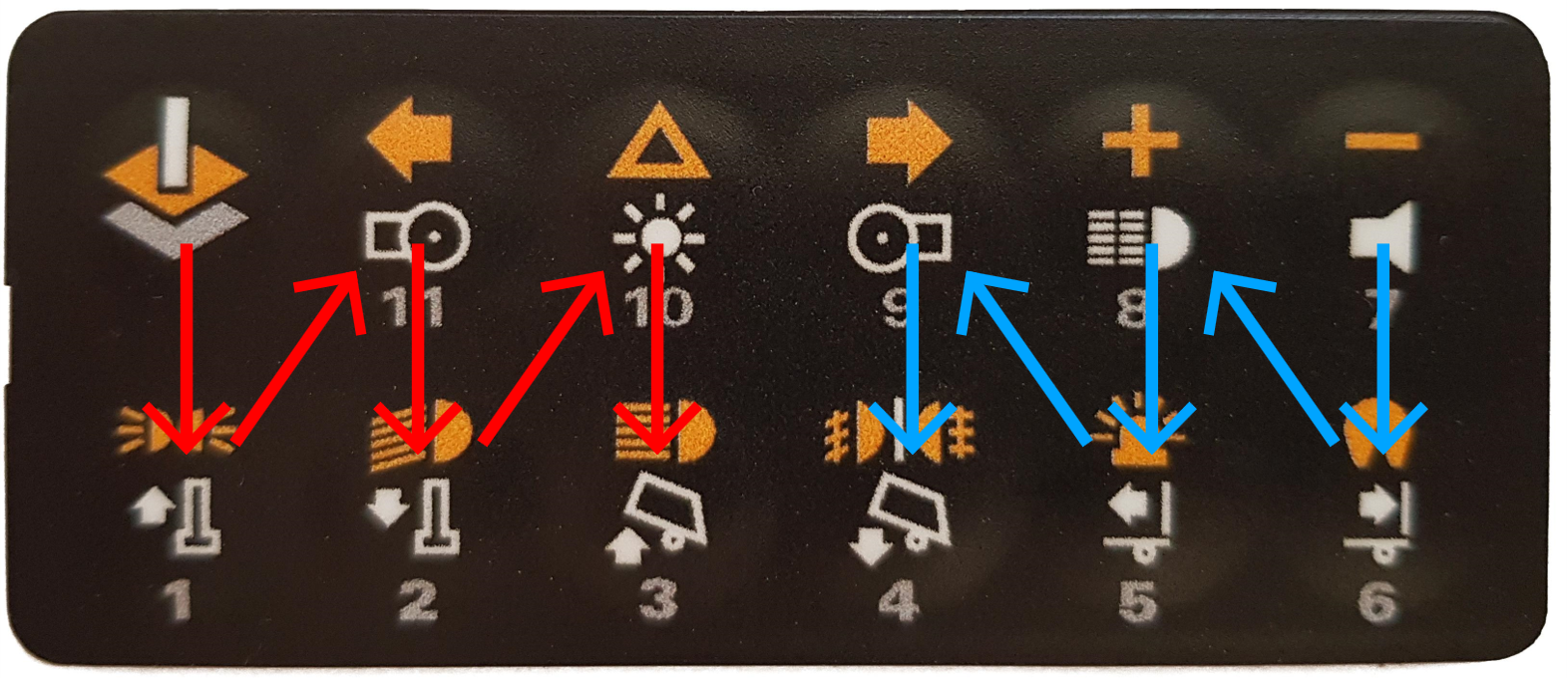
image18.png
If one of the second values (85.5% or -85.5%) is greater than 90% or less than -90%, the output is too high. If one of the values is less than 15%, please refer to section 5.11.
Also enter the percentage values for high beam and fog lights in the system settings of the KLM (see chapter 5.9).
The pad is connected, but no value changes in the live data
- Check if the pad is connected correctly and the correct receiver output is used.
- A directly connected servo should move when a button is pressed.