Settings
Our EasyBus systems offer two types of settings:
- System settings: Apply to the entire module or system (e.g., blink interval, receiver type, brake light type).
- Output settings: Apply only to the respective output (see Chapter 7 "Functions").
Open system settings
Via the gear icon or the menu "System" → "System settings".

image41.png
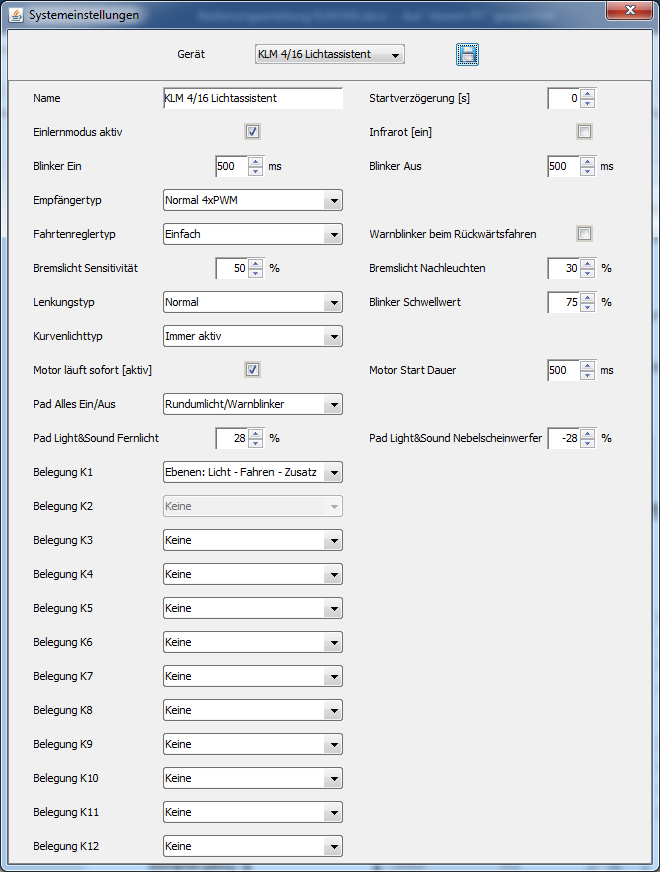
image42.png
| Name | Description |
|---|---|
| Start delay [s] | Delays system start to account for startup times of remote controls. |
| Learning mode [active] | Activates/deactivates manual learning mode via throttle and steering stick. ControlPanel learning remains active. |
| Infrared [on] | Switches output 8 to infrared operation. |
| Blinker On/Off | Defines blink interval in 10 ms steps (e.g., 500 ms = 0.5 s). |
| Receiver type | See Chapter 8 "Control variants / Receiver type". |
| Speed controller type | See Chapter 9.1 "Speed controller type". |
| Hazard lights when reversing | Automatic activation of hazard lights when reversing. |
| Brake light sensitivity | See Chapter 9.2 "Intelligent brake light". |
| Brake light afterglow | See Chapter 9.2 "Intelligent brake light". |
| Steering type | See Chapter 9.3 "Steering type". |
| Blinker threshold | See Chapter 9.3 "Steering type". |
| Cornering light type | See Chapter 0 "Cornering light type". |
| Engine runs immediately [active] | See Chapter 10 "Sound module". |
| Engine start duration | See Chapter 10 "Sound module". |
| Pad All On/Off | Configures behavior of the "All On/Off" button on control pads. |
| Pad Light&Sound High beam | See control pad Light & Sound manual. |
| Pad Light&Sound Fog lights | See control pad Light & Sound manual. |
| Assignment K1 – K12 | See Chapter 13.6 "User defined". |